I had been having quite a few issues with my Notes client. Whether I was writing an email, editing a document or typing in a Sametime message the client would intermittently stop doing anything visibly, then would go grey coloured, and the Title bar at the top would show "IBM Lotus Notes (Not Responding)". After half a minute or so Notes would start responding again and perform fine, however after a few minutes I would get a repeat performance.
Apparently this can be put down to operating on a poor or slow network, going into offline mode could fix it, however it had been working without any real issue for a few months.
After taking advice from David Fry, from the Lotus Staines office, I installed 'Fix Pack 1' for 8.5.2. and all appears to be well thankfully. it's nice to have things working well again.
Showing posts with label lotus. Show all posts
Showing posts with label lotus. Show all posts
Thursday, March 24, 2011


Monday, March 16, 2009
Notes 8.5.1 on Ubuntu - composite applications
We had a recent update to the latest build on Lotus Notes 8.5.1 on Ubuntu. As usual the update appeared to go perfectly.
One of the new capabilities I had looked forward to was the inclusion of the Composite Application Editor (cae). The synaptic package name was "ibm-notes-cae".
When I created a new Composite application - I was given the instruction to use the ..."'Actions > Edit application' menu item to add content." Alas the "Actions" menu was not visible. First I tried removing the ibm-notes-cae package and reinstalling it, however this had no effect.
Ray Davies suggested I shut down Notes and rename the "workspace" directory within the notes/data directory and restarting the Notes Client. After a restart the "Actions" menu appeared and I could edit the composite app.
I did have to recreate the previous widgets I had been using - but that was not such a big deal - and I was back to work in five minutes flat.
Which was nice :-)
One of the new capabilities I had looked forward to was the inclusion of the Composite Application Editor (cae). The synaptic package name was "ibm-notes-cae".
When I created a new Composite application - I was given the instruction to use the ..."'Actions > Edit application' menu item to add content." Alas the "Actions" menu was not visible. First I tried removing the ibm-notes-cae package and reinstalling it, however this had no effect.
Ray Davies suggested I shut down Notes and rename the "workspace" directory within the notes/data directory and restarting the Notes Client. After a restart the "Actions" menu appeared and I could edit the composite app.
I did have to recreate the previous widgets I had been using - but that was not such a big deal - and I was back to work in five minutes flat.
Which was nice :-)
Tuesday, December 23, 2008
Mobile and not so mobile access to Domino apps
I was recently checking out the IdeaJam website and really liked the work that Bruce and Matt having been doing there. Matts use of xPages has resulted in a very functional yet modern looking web application that just happens to be built on Domino.
Matt has recently been working with the Hursley team on the xPages workshop - so he knows a thing or two about the subject.
I noticed that there was a url to access IdeaJam via the iPhone. Take the time to have a look as it's a lovely piece of work. Bruce informed me that this was based on work by Jeff Gilfelt - with instructions on how to do it here.
This should make it easy to give iPhone users access to Domino data - at least to view it, however it also shows up really well as a widget in the notes 8.5 sidebar, (which is nice).

Matt has recently been working with the Hursley team on the xPages workshop - so he knows a thing or two about the subject.
I noticed that there was a url to access IdeaJam via the iPhone. Take the time to have a look as it's a lovely piece of work. Bruce informed me that this was based on work by Jeff Gilfelt - with instructions on how to do it here.
This should make it easy to give iPhone users access to Domino data - at least to view it, however it also shows up really well as a widget in the notes 8.5 sidebar, (which is nice).

Wednesday, December 10, 2008
How to determine the version of Portal or Quickr you are running
After installing Quickr I wanted to check for updates on the IBM Fix Central website.
The check for the correct fix the site requested whether I was using version 8.0.0.0 or 8.0.0.2.
To check this I looked for the file C:\IBM\Quickr\PortalServer\version\TS.product which is an xml file - Wordpad should be ok to read it.
The installed version was listed as "8.0.0.0
Easy when you know how :-)
The check for the correct fix the site requested whether I was using version 8.0.0.0 or 8.0.0.2.
To check this I looked for the file C:\IBM\Quickr\PortalServer\version\TS.product which is an xml file - Wordpad should be ok to read it.
The installed version was listed as "
Easy when you know how :-)
Wednesday, November 26, 2008
Portal 6.1 - difficulty adding an administrator
I installed WebSphere Portal express 6.1 on a Windows 2003 server in a demo environment and ran the config wizard to secure the server to an Active Directory running on a second server.
Adding an Active Directory user as a member of the preexisting "wpsadmins" group proved difficult and resulted in the "EJPAL3030E" error - most likely relating to a misconfigured group attribute.
As time was limited to complete the demo I simply logged into the Portal as the "wpsadmin" user, chose the AD user I wanted to promote to a Portal administrator and selected the icon to "duplicate role" of the wpsadmin user.
Now the AD user can see the "administration" tab in portal.
Whew!
Adding an Active Directory user as a member of the preexisting "wpsadmins" group proved difficult and resulted in the "EJPAL3030E" error - most likely relating to a misconfigured group attribute.
As time was limited to complete the demo I simply logged into the Portal as the "wpsadmin" user, chose the AD user I wanted to promote to a Portal administrator and selected the icon to "duplicate role" of the wpsadmin user.
Now the AD user can see the "administration" tab in portal.
Whew!
Tuesday, November 25, 2008
Analysis of a Domino NSD report - howto
Looking through the LDD website can be a good use of time. There are plenty of tips to be found. Today I was looking through this section and found a presentation from Lotusphere 2008 on "Using NSD – A Practical Guide".
This was written by Elliott Harden and Joe Wallace.
The explanations seem pretty clear, while not suited for an absolute beginner, it is certainly a good starting point.
Semaphore debugging has never been so much fun.
This was written by Elliott Harden and Joe Wallace.
The explanations seem pretty clear, while not suited for an absolute beginner, it is certainly a good starting point.
Semaphore debugging has never been so much fun.
Friday, September 12, 2008
Email becomes a dangerous distraction
The Sydney Morning Herald ran a story on the effects of email on a persons productivity and had this to say.
"In a study last year, Dr Thomas Jackson of Loughborough University, England, found that it takes an average of 64 seconds to recover your train of thought after interruption by email (bit.ly/email2). So people who check their email every five minutes waste 81/2hours a week figuring out what they were doing moments before."
There is more to life than email - but I do wonder about all those Twitter and IM interuptions. :)
drthomasjackson.com
The related study, at least I think it's the one, is here
"In a study last year, Dr Thomas Jackson of Loughborough University, England, found that it takes an average of 64 seconds to recover your train of thought after interruption by email (bit.ly/email2). So people who check their email every five minutes waste 81/2hours a week figuring out what they were doing moments before."
There is more to life than email - but I do wonder about all those Twitter and IM interuptions. :)
drthomasjackson.com
The related study, at least I think it's the one, is here
Tuesday, September 02, 2008
Ubuntu 8.04 on my Thinkpad T60p (Part 6)
I already had Notes 8.5 beta 1 installed on Ubuntu 8.04 and wanted to upgrade to beta 2. As this is at beta stage there is apparently no upgrade from beta 1 to beta 2 so the first thing I did was backup my Notes data directory which was in /home/myname/lotus/notes/data.
Secondly I used Synaptic to remove “ibm-lotus-notes”.
Once this was successfully completed I closed Synaptic, opened a terminal window, and ran the following commands in this particular order...
sudo dpkg -i ibm_lotus_notes-8.5.i586.deb
sudo dpkg -i ibm_lotus_activities-8.5.i586.deb
sudo dpkg -i ibm_lotus_cae-8.5.i586.deb
sudo dpkg -i ibm_lotus_sametime-8.5.i586.deb
sudo dpkg -i ibm_lotus_symphony-8.5.i586.deb
I was then able to start Notes from the Applications menu - There was a license agreement to accept – otherwise straight in.
It is fast – really fast.
Thanks to Ray for the pointers.
Secondly I used Synaptic to remove “ibm-lotus-notes”.
Once this was successfully completed I closed Synaptic, opened a terminal window, and ran the following commands in this particular order...
sudo dpkg -i ibm_lotus_notes-8.5.i586.deb
sudo dpkg -i ibm_lotus_activities-8.5.i586.deb
sudo dpkg -i ibm_lotus_cae-8.5.i586.deb
sudo dpkg -i ibm_lotus_sametime-8.5.i586.deb
sudo dpkg -i ibm_lotus_symphony-8.5.i586.deb
I was then able to start Notes from the Applications menu - There was a license agreement to accept – otherwise straight in.
It is fast – really fast.
Thanks to Ray for the pointers.
Thursday, July 24, 2008
Demonstrating Lotus Sametime
When demonstrating Lotus Sametime I like to show dialogue between real people logged into the system. When a network connection is not available this can get a little tricky.
Mikkel Heisterberg has published a tool via Intravision that allows you to simulate people logged into Sametime in various states such as Avalable, In a Meeting, etc.
I've used similar tools in the past that people have hacked together - however this looks like a really nice solution.
Now, if I just had a little Sametime "bot" that could give answers to questions.
Mikkel Heisterberg has published a tool via Intravision that allows you to simulate people logged into Sametime in various states such as Avalable, In a Meeting, etc.
I've used similar tools in the past that people have hacked together - however this looks like a really nice solution.
Now, if I just had a little Sametime "bot" that could give answers to questions.
Tuesday, July 01, 2008
Installation of Lotus Foundations - Part 3
Foundations Start
Now that Foundations Core has been installed and is up and running it's time to install Foundations Start. This is the part of Foundations that includes the Domino email server.
From my Ubuntu client – I started Nautilus file browser, clicked on Network Servers and the system found the Foundations server. Windows Explorer should do the same (file - run - \\ipaddress).
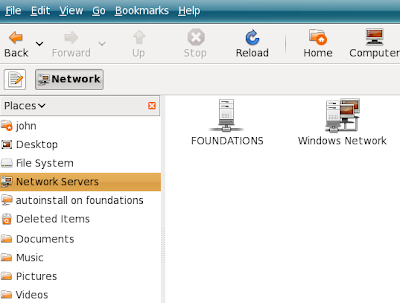
Opening the “Foundations” server required the “root” username and password. The shared folders included one called "autoinstall".
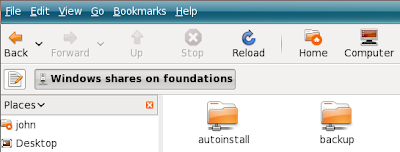 Foundations start is supplied in a file called lfstart-domino-2960.pkg. Copy this file to the autoinstall directory on the Foundations Base server.
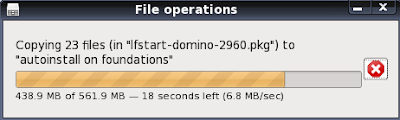
Once it has been copied click the "Software Update" menu to see when it is recognised.
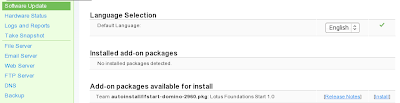
When you see the "Installed add-on package" is available you can click on "install". As this package contains a Domino server you should ensure you have sufficient ram allocated to the machine. When you have clicked "install" you should see the following message on the "Status" page.

 As the install progresses informational messages are displayed like the next screenshot.
 Eventually, after 10 minutes or so you should see.....
 So easy.
Now that Foundations Core has been installed and is up and running it's time to install Foundations Start. This is the part of Foundations that includes the Domino email server.
From my Ubuntu client – I started Nautilus file browser, clicked on Network Servers and the system found the Foundations server. Windows Explorer should do the same (file - run - \\ipaddress).

Opening the “Foundations” server required the “root” username and password. The shared folders included one called "autoinstall".
 Foundations start is supplied in a file called lfstart-domino-2960.pkg. Copy this file to the autoinstall directory on the Foundations Base server.
Once it has been copied click the "Software Update" menu to see when it is recognised.

When you see the "Installed add-on package" is available you can click on "install". As this package contains a Domino server you should ensure you have sufficient ram allocated to the machine. When you have clicked "install" you should see the following message on the "Status" page.

 As the install progresses informational messages are displayed like the next screenshot.
 Eventually, after 10 minutes or so you should see.....
 So easy.
Monday, June 30, 2008
Installation of Lotus Foundations - Part 2
Once you have logged in to Foundations as the root user you should see the "System Status" screen where you can make alterations to your system.
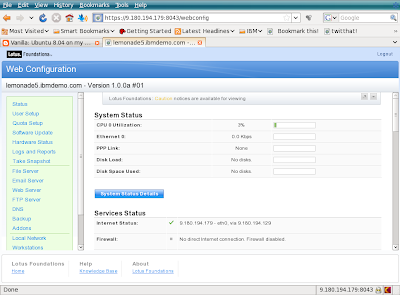
At this point the Foundations server is running entirely in memory as there are no Hard Disks available. Looking further through the “Services Status” in the screenshot above you will find the following detail.
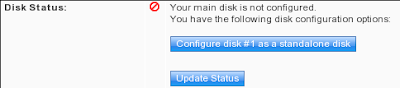
Click the "Configure disk #1 as a standalone disk" to format the hard disk and write the Foundations code to it. As this example was created in a VMware image there is no existant data to worry about - just make sure you don't overwrite something important.
Click the "Update Status" button to keep track of when the server has finished configuring the disk.
Once the “Update Status” shows that the disk is available – srcoll down to the bottom of the “Web Configuration” page and choose to “Shutdown” the server. Edit the settings for the VM image and set the DVD drive to be the physical drive, we don't want it to open the ISO image now that the Foundations server can boot fron the hard disk.
Restart the Vmware image and login as root.
At this point the foundations Core server has been installed. The Next step is to install “Foundations Start”.

At this point the Foundations server is running entirely in memory as there are no Hard Disks available. Looking further through the “Services Status” in the screenshot above you will find the following detail.

Click the "Configure disk #1 as a standalone disk" to format the hard disk and write the Foundations code to it. As this example was created in a VMware image there is no existant data to worry about - just make sure you don't overwrite something important.
Click the "Update Status" button to keep track of when the server has finished configuring the disk.
Once the “Update Status” shows that the disk is available – srcoll down to the bottom of the “Web Configuration” page and choose to “Shutdown” the server. Edit the settings for the VM image and set the DVD drive to be the physical drive, we don't want it to open the ISO image now that the Foundations server can boot fron the hard disk.
Restart the Vmware image and login as root.
At this point the foundations Core server has been installed. The Next step is to install “Foundations Start”.
Installation of Lotus Foundations - Part 1
Installation of Foundations into VMWare

From your host machine point firefox at https//9.180.19.179:8043. (your ipaddress will differ). You will likely have to add a security exception to add the x.509 certificate for the Foundations server to your browser. Then you should see the following screen, followed by a similar IBM Software Agreement screen.
I created a new VMware machine as a Suse Linux machine with 20GB HD. In the VM settings for the machine I set the DVD to point to the Foundations ISO file, "10_00a1.iso", as the CD drive.
When the Virtual Machine starts the ISO file is loaded and boots Lotus Foundations into memory and displays the following screen.
From your host machine point firefox at https//9.180.19.179:8043. (your ipaddress will differ). You will likely have to add a security exception to add the x.509 certificate for the Foundations server to your browser. Then you should see the following screen, followed by a similar IBM Software Agreement screen.

Once the agreements have been accepted you will see the initial setup screen below.

Fill in a suitable password for the root user and enter your domain name. If you have an Activation Key – fill it in – otherwise the server will run in a time limited mode. Once you click “Save Changes” the root account is created and you are provided with a "Login" button.
Click to Login, and enter the username “root” and the pasword you created previously. You can then view and alter the system status and configuration in the next screen
Tuesday, July 10, 2007
The BBC have an article discussing how there is an issue with older Word documents becoming harder to read as older versions of Windows and Office are made obsolete.
Here's the accompanying movie.
Lovely - so the solution appears to be that the BBC demonstrate how cool Vista looks as opposed to older versions and then proceeds to demonstrate the need to use MS Virtual PC in conjunction with an ever increasing selection of Virtual PC images just to read a text document. Have they heard of Heath Robinson?
Of course - if you really want to be able to read some important documents after a decade or two - you could choose ODF, OpenOffice, StarOffice, Lotus Notes 8, Neo Office, etc....who mentioned license fee?
Here's the accompanying movie.
Lovely - so the solution appears to be that the BBC demonstrate how cool Vista looks as opposed to older versions and then proceeds to demonstrate the need to use MS Virtual PC in conjunction with an ever increasing selection of Virtual PC images just to read a text document. Have they heard of Heath Robinson?
Of course - if you really want to be able to read some important documents after a decade or two - you could choose ODF, OpenOffice, StarOffice, Lotus Notes 8, Neo Office, etc....who mentioned license fee?
Wednesday, May 23, 2007
Quickr online presentations
Although Quickr there is not a publicly available demonstration server for Quickr just yet... there are a few online demonstration movies or screencams available.
Luis Suarez has made one available online here , and offline here.
Additionally Rob Novak and his team are responsible for some amazing free (open source?) templates for Quickr which provide a load of really cool functionality. A couple of them are demonstrated online, namely the QPresent and QPhotos.
Further online demos of Lotus software are available here, including Notes 8, Quickr, ActiveInsight, Domain Monitoring, and DWA.
something for all the family
Luis Suarez has made one available online here , and offline here.
Additionally Rob Novak and his team are responsible for some amazing free (open source?) templates for Quickr which provide a load of really cool functionality. A couple of them are demonstrated online, namely the QPresent and QPhotos.
Further online demos of Lotus software are available here, including Notes 8, Quickr, ActiveInsight, Domain Monitoring, and DWA.
something for all the family
Tuesday, April 17, 2007
Domino 8 Linux issues - resolved
I had a couple of issues setting up the Domino 8 beta server on Linux.
Firstly – when installing the server, do not select to create the symbolic link – softlink if you are installing into the default locations.
Also I had the usual problem where xwindows could not display the setup program. The error was
“Please edit your shell's DISPLAY environment variable to
reflect an unlocked terminal that you would like to launch
the Domino Setup Program”
The fix was to su to root and run the command /usr/X11R6/bin/xhost this sets security to let the machine export the display on it's own screen
then as the “notes” user run...
DISPLAY=:0.0
export DISPLAY
Once this is done cd to the /local/notesdata directory and run /opt/ibm/lotus/bin/server to start the setup program.
Firstly – when installing the server, do not select to create the symbolic link – softlink if you are installing into the default locations.
Also I had the usual problem where xwindows could not display the setup program. The error was
“Please edit your shell's DISPLAY environment variable to
reflect an unlocked terminal that you would like to launch
the Domino Setup Program”
The fix was to su to root and run the command /usr/X11R6/bin/xhost
then as the “notes” user run...
DISPLAY=:0.0
export DISPLAY
Once this is done cd to the /local/notesdata directory and run /opt/ibm/lotus/bin/server to start the setup program.
Subscribe to:
Posts (Atom)