I was installing the apiconnect developer toolkit last night to run through a couple of labs on behalf of a customer.
Usually that just requires running 'npm install -g apiconnect' and the job is done.
The laptop installation failed unexpectedly and so I started to troubleshoot by looking through the installation log file. After far too long I though it could be the version of Node/npm as this is on a new laptop.
The npm version was 6.7.0. Node was 11.4.0
I uninstalled node and installed version 10.15.1 of node instead which adds npm 6.4.1.
Running npm install -g apiconnect' then worked properly and I could get on with the lab.
The node.js / npm version were probably too new and the install script had not been able to complete. The older versions worked well.
In retrospect - I downgraded Node.js to the LTS version.
Thursday, February 14, 2019


Tuesday, September 25, 2018
Kubernetes in an Ubuntu VM
Installing Kubernetes on Ubuntu
This is not all my own work in any way - but relies on previous materials.
I started with an Ubuntu VM running 4GB ram and 3 cores with 80GB disk
The Kubelet service will not start (apparently) unless swap has been disabled on any Kube master or node. I'm sure there's a good reason and it may be overall performance of a large subcapacity system
Sudo swapoff -a and comment out swap in /etc/fstabwith a #
tar -zxvf helm-v2.8.2-linux-amd64.tar.gz
chmod +x linux-amd64/helm
sudo mv spt-get update && sudo apt-get install -y apt-transport-https
sudo apt install docker.io
sudo systemctl start docker
sudo systemctl enable docker
sudo curl -s https://packages.cloud.google.com/apt/doc/apt-key.gpg | sudo apt-key add
sudo touch /etc/apt/sources.list.d/kubernetes.list (edit this file with vi and add 'deb http://apt.kubernetes.io/ kubernetes-xenial main')
sudo apt-get update
sudo apt-get install -y kubelet=1.9.6-00 kubeadm=1.9.6-00 kubectl=1.9.6-00 kuberneters-cni
sudo kubeadm init --pod-network-cidr 'your v4 IP address'/16
once this completes...
mkdir -p ~/.kube
sudo cp -f /etc/kubernetes/admin.conf ~/.kube
sudo chmod 755 -R ~/.kube
kubectl get po -n kube-system (0/3 dns pods will be running)
kubectl apply -f https://docs.projectcalico.org/v3.1/getting-started/kubernetes/installation/hosted/rbac-kdd.yaml
kubectl apply -f https://docs.projectcalico.org/v3.1/getting-started/kubernetes/installation/hosted/kubernetes-datastore/calico-networking/1.7/calico.yaml
kubectl get po -n kube-system (3/3 dns pods should be running - may take a little while - in a VM where they would not start I tracked this down to insufficient CPU cores assigned to the VM by using 'kubectl describe po kube-dns-xxxxxxxxxz-xxxxx -n kube-system')
kubectl taint nodes --all node-role.kuberneters.io/master (allows this master node to run workloads - however I had difficulty getting this to complete in a way that looked successful)
The result is Kubernetes is up and running.
This is not all my own work in any way - but relies on previous materials.
I started with an Ubuntu VM running 4GB ram and 3 cores with 80GB disk
The Kubelet service will not start (apparently) unless swap has been disabled on any Kube master or node. I'm sure there's a good reason and it may be overall performance of a large subcapacity system
Sudo swapoff -a and comment out swap in /etc/fstabwith a #
tar -zxvf helm-v2.8.2-linux-amd64.tar.gz
chmod +x linux-amd64/helm
sudo mv spt-get update && sudo apt-get install -y apt-transport-https
sudo apt install docker.io
sudo systemctl start docker
sudo systemctl enable docker
sudo curl -s https://packages.cloud.google.com/apt/doc/apt-key.gpg | sudo apt-key add
sudo touch /etc/apt/sources.list.d/kubernetes.list (edit this file with vi and add 'deb http://apt.kubernetes.io/ kubernetes-xenial main')
sudo apt-get update
sudo apt-get install -y kubelet=1.9.6-00 kubeadm=1.9.6-00 kubectl=1.9.6-00 kuberneters-cni
sudo kubeadm init --pod-network-cidr 'your v4 IP address'/16
once this completes...
mkdir -p ~/.kube
sudo cp -f /etc/kubernetes/admin.conf ~/.kube
sudo chmod 755 -R ~/.kube
kubectl get po -n kube-system (0/3 dns pods will be running)
kubectl apply -f https://docs.projectcalico.org/v3.1/getting-started/kubernetes/installation/hosted/rbac-kdd.yaml
kubectl apply -f https://docs.projectcalico.org/v3.1/getting-started/kubernetes/installation/hosted/kubernetes-datastore/calico-networking/1.7/calico.yaml
kubectl get po -n kube-system (3/3 dns pods should be running - may take a little while - in a VM where they would not start I tracked this down to insufficient CPU cores assigned to the VM by using 'kubectl describe po kube-dns-xxxxxxxxxz-xxxxx -n kube-system')
kubectl taint nodes --all node-role.kuberneters.io/master (allows this master node to run workloads - however I had difficulty getting this to complete in a way that looked successful)
The result is Kubernetes is up and running.
Monday, September 24, 2018
Is this thing still on?......
I reckon I will need to keep a few notes on technical issues so this blog is returning after a very long sleep.
Tuesday, April 09, 2013
Organising thoughts and a few constraints
I am always on the lookout for a better way of visually organising a seemingly random set of thoughts and notes in order to see where there are commonalities that could be useful. Some of the tools I use include pen & paper, mindmaps, and diagrams. Some of the products include Freemind, Xmind, OneNote, and the usual selection of presentation tools.

Recently I found this table, via http://fluentbrain.com/ on the benefits of thinking visually, which is open to interpretation, on the benefits of using a visual tool to organise your thoughts. What stuck out to me was the reference to TOC Processes. I'm used to the idea that when you are trying to come up with a solution to a problem that there are a few constants such as Inputs, Outputs, Controls and Constraints. TOC Processes was a new term to me.
TOC Processes
TOC is the "Theory of Constraints", a term which led me to this relatively short document... "The Theory of Constraints and its Thinking Processes" from the Goldratt Institute. The document starts by relating how organisations have become measured in parts, by department, rather than as a whole entity - leading to situations where multiple parts of the same company can end up working antagonistically and as a result not performing as well as could be expected. The idea being that the TOC process can help you identify where "undesirable effects" are occuring and what needs to change - mainly assumptions that "it's always been done this way". As with most of these things there is a large element of change management which is always fun. I'm still on the lookout for the perfect note taking or visualisation tool if you have any suggestions.
Recently I found this table, via http://fluentbrain.com/ on the benefits of thinking visually, which is open to interpretation, on the benefits of using a visual tool to organise your thoughts. What stuck out to me was the reference to TOC Processes. I'm used to the idea that when you are trying to come up with a solution to a problem that there are a few constants such as Inputs, Outputs, Controls and Constraints. TOC Processes was a new term to me.
TOC Processes
TOC is the "Theory of Constraints", a term which led me to this relatively short document... "The Theory of Constraints and its Thinking Processes" from the Goldratt Institute. The document starts by relating how organisations have become measured in parts, by department, rather than as a whole entity - leading to situations where multiple parts of the same company can end up working antagonistically and as a result not performing as well as could be expected. The idea being that the TOC process can help you identify where "undesirable effects" are occuring and what needs to change - mainly assumptions that "it's always been done this way". As with most of these things there is a large element of change management which is always fun. I'm still on the lookout for the perfect note taking or visualisation tool if you have any suggestions.
Thursday, March 24, 2011
Lotus Notes 8.5.2 - not responding
I had been having quite a few issues with my Notes client. Whether I was writing an email, editing a document or typing in a Sametime message the client would intermittently stop doing anything visibly, then would go grey coloured, and the Title bar at the top would show "IBM Lotus Notes (Not Responding)". After half a minute or so Notes would start responding again and perform fine, however after a few minutes I would get a repeat performance.
Apparently this can be put down to operating on a poor or slow network, going into offline mode could fix it, however it had been working without any real issue for a few months.
After taking advice from David Fry, from the Lotus Staines office, I installed 'Fix Pack 1' for 8.5.2. and all appears to be well thankfully. it's nice to have things working well again.
Apparently this can be put down to operating on a poor or slow network, going into offline mode could fix it, however it had been working without any real issue for a few months.
After taking advice from David Fry, from the Lotus Staines office, I installed 'Fix Pack 1' for 8.5.2. and all appears to be well thankfully. it's nice to have things working well again.
Tuesday, February 09, 2010
Notes URLs – easier than I thought
I needed to create a link from an html document to a Lotus Notes document. It’s years since I had to do that and I immediately ran into issues choosing syntax – such as should I use the fully qualified domain name of the server etc.
I decided instead to open the document in Notes – and choose ‘Edit’/’Copy As’/’Document Link’ from the menu. Pasting that into a document editor gave a result such as..
<NDL>
<REPLICA 81256A76:0076FB83>
<VIEW OF39D46BF5:E8F08834-ON852564B5:00139B2C>
<NOTE OFEC4650AB:44EC5B7B-ON802576C4:0067E5A9>
<HINT>CN=SERVERNAME/OU=A6/OU=M/O=TEST</HINT>
</NDL>
I was trying too hard. I started to converted this to an href – however It was easier just to paste the url into a Sametime chat which converted it into the perfect format Notes://SERVERNAME/80256A760076FB83/38D46BF5E8F08834852564B500129B2C/EC4650AB44EC5B7B802576C40067E5A9
Then I wrapped that into an href tag and the job was done.
Tuesday, December 15, 2009
Ubuntu 9.10 on my Thinkpad T60p GDM + ATI issues at startup
OK - so this T60p is getting a little bit battered looking - screen needs replaced for the second time etc...but it's still working. I've been running Ubuntu 9.04 for the last few months with no problems - even the upgrade from 8.10 was smooth(ish).
Yesterday I ran the upgrade from 9.04 to 9.10. the result was anything but smooth. The system started but wouldn't get past the xsplash screen - where the login is supposed to appear, there was no sound either. I could log in to a tty screen via 'ctrl+alt+F2' - that was good. I noticed a lot of posts regarding issues with ATI drivers, and nvidia for that matter, so experimented with old versions of xorg.conf to no avail. the system would boot to a GUI if I chose 'Safe Mode' - normal boot - login at the prompt and run 'startx' - however performance was poor as the ATI drivers were not in use. end result was poor performance - no sound - and generally poor experience.
I burned a new 9.10 Live DVD and it loaded perfectly - no problems - so the issue must have related to the upgrade from my 9.04 system. Luckily enough I keep my home directory on a /dev/sda3, root on /dev/sda1 and swap on /dev/sda2.
I booted the 9.10 Live DVD, chose install, and formatted the root and swap partitions - leaving /dev/sda3 intact. Once the install was completed I mapped a drive to /dev/sda3 where my original home directory sits - the new path being '/mnt/home/name'. Messana has a simple and good guide here on mounting other partitions. Now that the original home partition was mounted I edited /etc/fstab (make a backup first) and changed my home directory to '/mnt/home/name'.
Once all that was done - I logged out and back in again to find my old workspace in all it's splendour, which was nice.
The simple message is if you have difficulty upgrading - just do a fresh install instead of fixing the issues as there were just too many issues to fix. Make your backups of course.
Yesterday I ran the upgrade from 9.04 to 9.10. the result was anything but smooth. The system started but wouldn't get past the xsplash screen - where the login is supposed to appear, there was no sound either. I could log in to a tty screen via 'ctrl+alt+F2' - that was good. I noticed a lot of posts regarding issues with ATI drivers, and nvidia for that matter, so experimented with old versions of xorg.conf to no avail. the system would boot to a GUI if I chose 'Safe Mode' - normal boot - login at the prompt and run 'startx' - however performance was poor as the ATI drivers were not in use. end result was poor performance - no sound - and generally poor experience.
I burned a new 9.10 Live DVD and it loaded perfectly - no problems - so the issue must have related to the upgrade from my 9.04 system. Luckily enough I keep my home directory on a /dev/sda3, root on /dev/sda1 and swap on /dev/sda2.
I booted the 9.10 Live DVD, chose install, and formatted the root and swap partitions - leaving /dev/sda3 intact. Once the install was completed I mapped a drive to /dev/sda3 where my original home directory sits - the new path being '/mnt/home/name'. Messana has a simple and good guide here on mounting other partitions. Now that the original home partition was mounted I edited /etc/fstab (make a backup first) and changed my home directory to '/mnt/home/name'.
Once all that was done - I logged out and back in again to find my old workspace in all it's splendour, which was nice.
The simple message is if you have difficulty upgrading - just do a fresh install instead of fixing the issues as there were just too many issues to fix. Make your backups of course.
Thursday, September 17, 2009
Searching Domino - a little Omnifind integration
I worked with an IBM Business Partner today to setup the integration between Domino 8.5 and Omnifind Enterprise Edition - also version 8.5 coincidentally.
Ominfind was already setup and working on multiple sources of information - Domino was simply an additional source to crawl. The integration with Domino can be over NRPC (requiring Domino libraries to be available to the Omnifind crawler), or via NDIIOP.
While reading the documentation (rtfm - we actually did it) We enabled DIIOP, setup the Omnifing Crawler for "notes" and were able to search and retrieve results. All in about 20 minutes. You could choose to search all nsf, individual nsf, data directories and individual notes views restricted by a simple selection formula.
We also installed the Notes plugin to place Omnifind in the Lotus Notes search bar - this also required editing to notes.ini to point to the Omnifind server. The end result was a fully integrated search across all the available datasources in the lab - with results available in the notes client.
My only question would be the relative performance of the DIIOP method as opposed to NRPC where a customer has a large amount of data to crawl.
The integration was smooth and really quite easy.
Ominfind was already setup and working on multiple sources of information - Domino was simply an additional source to crawl. The integration with Domino can be over NRPC (requiring Domino libraries to be available to the Omnifind crawler), or via NDIIOP.
While reading the documentation (rtfm - we actually did it) We enabled DIIOP, setup the Omnifing Crawler for "notes" and were able to search and retrieve results. All in about 20 minutes. You could choose to search all nsf, individual nsf, data directories and individual notes views restricted by a simple selection formula.
We also installed the Notes plugin to place Omnifind in the Lotus Notes search bar - this also required editing to notes.ini to point to the Omnifind server. The end result was a fully integrated search across all the available datasources in the lab - with results available in the notes client.
My only question would be the relative performance of the DIIOP method as opposed to NRPC where a customer has a large amount of data to crawl.
The integration was smooth and really quite easy.
Tuesday, August 11, 2009
Issues upgrading to Firefox 3.5 on Ubuntu
Upgrading Firefox from 3.0 to 3.5 on Ubuntu proved to be unusually awkward, however I got there in the end.
As 3.5 is now in the Ubuntu repositories I simply selected it in Synaptic Package Manager, clicked "apply" and it installed smoothly, however when I ran Firefox from the icon it actually launched Firefox 3.0 - not the shiny new 3.5 I was expecting. This was fixed by changing the symbolic link to point to the right version.
In the /usr/bin directory I ran "sudo rm firefox" to remove the existing link and "sudo ln firefox-3.5 firefox" to create the new link, allowing Firefox 3.5 to load as default.
So whilst happily launching Firefox 3.5 I now got an error message stating "XML Parsing Error: undefined entity Location: chrome://browser/content/browser.xul Line Number 34, Column 1" and of course Firefox crashed out.
To fix this I deleted the existing profile by running "mv .mozilla .mozilla.old" in the home directory "/home/yourname".
So after two quick fixes it's up and running and appears to be quite good.
I decided to blog this as otherwise I'd end up repeating the procedure and wonder how I fixed it last time :)
As 3.5 is now in the Ubuntu repositories I simply selected it in Synaptic Package Manager, clicked "apply" and it installed smoothly, however when I ran Firefox from the icon it actually launched Firefox 3.0 - not the shiny new 3.5 I was expecting. This was fixed by changing the symbolic link to point to the right version.
In the /usr/bin directory I ran "sudo rm firefox" to remove the existing link and "sudo ln firefox-3.5 firefox" to create the new link, allowing Firefox 3.5 to load as default.
So whilst happily launching Firefox 3.5 I now got an error message stating "XML Parsing Error: undefined entity Location: chrome://browser/content/browser.xul Line Number 34, Column 1" and of course Firefox crashed out.
To fix this I deleted the existing profile by running "mv .mozilla .mozilla.old" in the home directory "/home/yourname".
So after two quick fixes it's up and running and appears to be quite good.
I decided to blog this as otherwise I'd end up repeating the procedure and wonder how I fixed it last time :)
Monday, March 23, 2009
Shutter - Screenshot tool on Ubuntu
Screenshots are a necessary evil in order to make various documents a little more accessible. Various tools exist to do this and it all comes down to ease of use and personal preference.
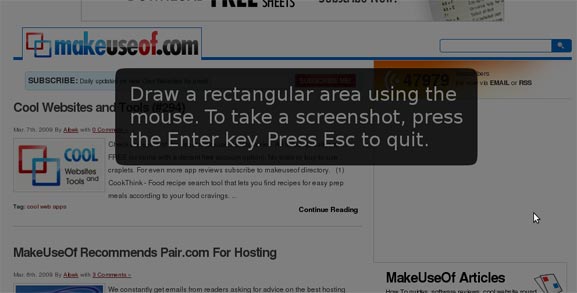
Shutter is a new app for Ubuntu and it's the best tool yet in terms of being able to select the section of screen that I want to grab - and it can be downloaded here
It's a bit strange to take a screenshot of a screenshot tool - so here's a link to the shutter website instead along with a suitable screenshot.
Shutter is a new app for Ubuntu and it's the best tool yet in terms of being able to select the section of screen that I want to grab - and it can be downloaded here
It's a bit strange to take a screenshot of a screenshot tool - so here's a link to the shutter website instead along with a suitable screenshot.
Monday, March 16, 2009
Notes 8.5.1 on Ubuntu - composite applications
We had a recent update to the latest build on Lotus Notes 8.5.1 on Ubuntu. As usual the update appeared to go perfectly.
One of the new capabilities I had looked forward to was the inclusion of the Composite Application Editor (cae). The synaptic package name was "ibm-notes-cae".
When I created a new Composite application - I was given the instruction to use the ..."'Actions > Edit application' menu item to add content." Alas the "Actions" menu was not visible. First I tried removing the ibm-notes-cae package and reinstalling it, however this had no effect.
Ray Davies suggested I shut down Notes and rename the "workspace" directory within the notes/data directory and restarting the Notes Client. After a restart the "Actions" menu appeared and I could edit the composite app.
I did have to recreate the previous widgets I had been using - but that was not such a big deal - and I was back to work in five minutes flat.
Which was nice :-)
One of the new capabilities I had looked forward to was the inclusion of the Composite Application Editor (cae). The synaptic package name was "ibm-notes-cae".
When I created a new Composite application - I was given the instruction to use the ..."'Actions > Edit application' menu item to add content." Alas the "Actions" menu was not visible. First I tried removing the ibm-notes-cae package and reinstalling it, however this had no effect.
Ray Davies suggested I shut down Notes and rename the "workspace" directory within the notes/data directory and restarting the Notes Client. After a restart the "Actions" menu appeared and I could edit the composite app.
I did have to recreate the previous widgets I had been using - but that was not such a big deal - and I was back to work in five minutes flat.
Which was nice :-)
Monday, January 12, 2009
Charging a blackberry on Ubuntu - barry
My Blackberry Curve is pretty handy - but it wasn't charging from the USB on the Thinkpad running Ubuntu.
I installed "barry" from here and ran the "bcharge" command from the command line which reportedly ups the USB from 100ma to 400ma.
The Curve seems to be charging now ! lovely.
All thanks to the dapper Martin Owens
I installed "barry" from here and ran the "bcharge" command from the command line which reportedly ups the USB from 100ma to 400ma.
The Curve seems to be charging now ! lovely.
All thanks to the dapper Martin Owens
Sunday, January 11, 2009
Reply to all email storm - don't blame the users
I always thought that reply to all was a bad idea as a default, It's nice that it is no longer the default in Notes, however this story does take it a little further.
An email storm has been created, apparently, by too many people doing "reply to all". However the resolution seems to be to blame the users of the system and ask that they be disciplined for clicking "reply to all" when using large distribution lists.
Maybe they are missing a point and should upgrade to Notes 8.5 :-)
An email storm has been created, apparently, by too many people doing "reply to all". However the resolution seems to be to blame the users of the system and ask that they be disciplined for clicking "reply to all" when using large distribution lists.
Maybe they are missing a point and should upgrade to Notes 8.5 :-)
Tuesday, December 23, 2008
Mobile and not so mobile access to Domino apps
I was recently checking out the IdeaJam website and really liked the work that Bruce and Matt having been doing there. Matts use of xPages has resulted in a very functional yet modern looking web application that just happens to be built on Domino.
Matt has recently been working with the Hursley team on the xPages workshop - so he knows a thing or two about the subject.
I noticed that there was a url to access IdeaJam via the iPhone. Take the time to have a look as it's a lovely piece of work. Bruce informed me that this was based on work by Jeff Gilfelt - with instructions on how to do it here.
This should make it easy to give iPhone users access to Domino data - at least to view it, however it also shows up really well as a widget in the notes 8.5 sidebar, (which is nice).

Matt has recently been working with the Hursley team on the xPages workshop - so he knows a thing or two about the subject.
I noticed that there was a url to access IdeaJam via the iPhone. Take the time to have a look as it's a lovely piece of work. Bruce informed me that this was based on work by Jeff Gilfelt - with instructions on how to do it here.
This should make it easy to give iPhone users access to Domino data - at least to view it, however it also shows up really well as a widget in the notes 8.5 sidebar, (which is nice).

Wednesday, December 10, 2008
How to determine the version of Portal or Quickr you are running
After installing Quickr I wanted to check for updates on the IBM Fix Central website.
The check for the correct fix the site requested whether I was using version 8.0.0.0 or 8.0.0.2.
To check this I looked for the file C:\IBM\Quickr\PortalServer\version\TS.product which is an xml file - Wordpad should be ok to read it.
The installed version was listed as "8.0.0.0
Easy when you know how :-)
The check for the correct fix the site requested whether I was using version 8.0.0.0 or 8.0.0.2.
To check this I looked for the file C:\IBM\Quickr\PortalServer\version\TS.product which is an xml file - Wordpad should be ok to read it.
The installed version was listed as "
Easy when you know how :-)
Wednesday, November 26, 2008
Portal 6.1 - difficulty adding an administrator
I installed WebSphere Portal express 6.1 on a Windows 2003 server in a demo environment and ran the config wizard to secure the server to an Active Directory running on a second server.
Adding an Active Directory user as a member of the preexisting "wpsadmins" group proved difficult and resulted in the "EJPAL3030E" error - most likely relating to a misconfigured group attribute.
As time was limited to complete the demo I simply logged into the Portal as the "wpsadmin" user, chose the AD user I wanted to promote to a Portal administrator and selected the icon to "duplicate role" of the wpsadmin user.
Now the AD user can see the "administration" tab in portal.
Whew!
Adding an Active Directory user as a member of the preexisting "wpsadmins" group proved difficult and resulted in the "EJPAL3030E" error - most likely relating to a misconfigured group attribute.
As time was limited to complete the demo I simply logged into the Portal as the "wpsadmin" user, chose the AD user I wanted to promote to a Portal administrator and selected the icon to "duplicate role" of the wpsadmin user.
Now the AD user can see the "administration" tab in portal.
Whew!
Tuesday, November 25, 2008
Analysis of a Domino NSD report - howto
Looking through the LDD website can be a good use of time. There are plenty of tips to be found. Today I was looking through this section and found a presentation from Lotusphere 2008 on "Using NSD – A Practical Guide".
This was written by Elliott Harden and Joe Wallace.
The explanations seem pretty clear, while not suited for an absolute beginner, it is certainly a good starting point.
Semaphore debugging has never been so much fun.
This was written by Elliott Harden and Joe Wallace.
The explanations seem pretty clear, while not suited for an absolute beginner, it is certainly a good starting point.
Semaphore debugging has never been so much fun.
Monday, November 17, 2008
Ubuntu 8.10 on my Thinkpad T60p - (Part 3 - External Monitors/Projectors)
Since the upgrade to 8.10 of Ubuntu from 8.04 I found that the ATI Catalyst Control Centre (ccc) had been removed from the Applications menu.
Looking at Synaptic I saw that there was a package called fglrx-amdcccle already installed. This is the control Centre - it had just been missing from the menu. After a little hunting I determined the Control Centre could be invoked by running the command "amdccle".
To Simplify this a little I created a menu item for the "ccc" by right clicking on the "Applications" menu, selecting "Edit Menus" and then "New Item" - and filling out the details as shown below.

The is the app you need to control external monitors working with the T60p.
Looking at Synaptic I saw that there was a package called fglrx-amdcccle already installed. This is the control Centre - it had just been missing from the menu. After a little hunting I determined the Control Centre could be invoked by running the command "amdccle".
To Simplify this a little I created a menu item for the "ccc" by right clicking on the "Applications" menu, selecting "Edit Menus" and then "New Item" - and filling out the details as shown below.

The is the app you need to control external monitors working with the T60p.
Thursday, November 13, 2008
Ubuntu 8.10 on my Thinkpad T60p - (Part 2 - Cool Effects )
Earlier this week there were a few updates for Ubuntu via Synaptic. As usual I let the system apply the updates in it's typical smooth manner, however this time there was a problem.
When I restarted the system the usual Compiz graphics would not work at all. The cube you can keep - but I ned those wobbly windows. I restarted the system and chose to boot an older version of the Kernel and found the Compiz graphics were working to an extent, I had the wobbly windows but no Cube effect.
I booted back to the latest kernel. Running "fglrxinfo" in a terminal windows gave the error "BadRequest (invalid request code or no such operation)".
As usual there are a few websites giving long and complicated solutions to this problem. I just ran EnvyNG on the command line... "envyng -t" and selected the option to "Uninstall the ATI driver", then chose the option to "Install the ATI driver".
After a reboot the "fglrxinfo" gives a more useful output...
john@monza:~$ fglrxinfo
display: :0.0 screen: 0
OpenGL vendor string: ATI Technologies Inc.
OpenGL renderer string: ATI MOBILITY FireGL V5200
OpenGL version string: 2.1.8087 FireGL Release
And now I have the cylinder effect going in conjunction with the cube.

Thanks go to Alberto for EnvyNG yet again.
When I restarted the system the usual Compiz graphics would not work at all. The cube you can keep - but I ned those wobbly windows. I restarted the system and chose to boot an older version of the Kernel and found the Compiz graphics were working to an extent, I had the wobbly windows but no Cube effect.
I booted back to the latest kernel. Running "fglrxinfo" in a terminal windows gave the error "BadRequest (invalid request code or no such operation)".
As usual there are a few websites giving long and complicated solutions to this problem. I just ran EnvyNG on the command line... "envyng -t" and selected the option to "Uninstall the ATI driver", then chose the option to "Install the ATI driver".
After a reboot the "fglrxinfo" gives a more useful output...
john@monza:~$ fglrxinfo
display: :0.0 screen: 0
OpenGL vendor string: ATI Technologies Inc.
OpenGL renderer string: ATI MOBILITY FireGL V5200
OpenGL version string: 2.1.8087 FireGL Release
And now I have the cylinder effect going in conjunction with the cube.

Thanks go to Alberto for EnvyNG yet again.
Wednesday, November 12, 2008
Google predict the flu - what can they not do?
Google have done a little bit of work predicting your likelihood of catching the Flu if you live in the US. They have tracked search terms and found that queries on the Flu can allow them to predict outbreaks two weeks faster than existing systems.
In itself this is quite interesting - but what else could they track? Political affiliation in an upcoming election? Predict share price fluctuation in specific markets?
If I was a betting man I'd quite full access to their data - however I suppose google trends goes somewhere to this effect - however not with this granularity of geography.
Have a look here
In itself this is quite interesting - but what else could they track? Political affiliation in an upcoming election? Predict share price fluctuation in specific markets?
If I was a betting man I'd quite full access to their data - however I suppose google trends goes somewhere to this effect - however not with this granularity of geography.
Have a look here
Subscribe to:
Posts (Atom)